Run Afterburner from your AI assistant
Afterburner works with AI assistants such as Claude, Codex, Gemini, Cursor, GitHub Copilot, OpenClaw and Hermes, through MCP (Model Context Protocol). Your assistant can check balances, invite affiliates and record payments for you, using the same rules as the app.
The quick way
Paste this page’s address into your assistant and ask it to connect Afterburner. It reads the steps here and sets itself up, or tells you exactly where to click.
Assistants that read the web also find everything in plain text at https://afterburnerapp.com/llms.txt.
What your assistant can do
- See your program: affiliates with their balances, payout details and whether they can be paid; commissions; payments; stores; and referral link visits.
- Invite affiliates: create an affiliate and send their invitation email.
- Record payments you have already sent.
Changing rates, approving commissions early, pausing or removing affiliates, and settings stay in the app. Affiliates can connect their own assistant to see their links, balance and commissions.
Connect your assistant
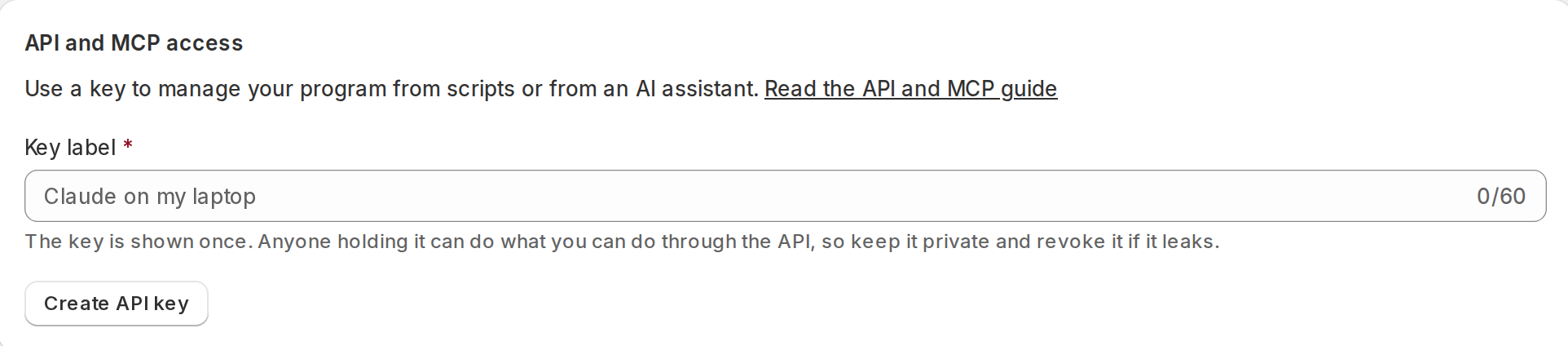
Open Afterburner in Shopify, go to Settings and create a key under “API and MCP access”. The key is shown once.
Then add Afterburner to your assistant. Replace ab_your_key with your key.
Claude Code
Run in a terminal:
claude mcp add --transport http afterburner https://afterburnerapp.com/mcp \
  --header "Authorization: Bearer ab_your_key"
Codex
Add to ~/.codex/config.toml, then set AFTERBURNER_KEY to your key in your environment:
[mcp_servers.afterburner]
url = "https://afterburnerapp.com/mcp"
bearer_token_env_var = "AFTERBURNER_KEY"
Gemini CLI
Add to ~/.gemini/settings.json:
{
  "mcpServers": {
    "afterburner": {
      "httpUrl": "https://afterburnerapp.com/mcp",
      "headers": {
        "Authorization": "Bearer ab_your_key"
      }
    }
  }
}
Cursor
Add to ~/.cursor/mcp.json:
{
  "mcpServers": {
    "afterburner": {
      "url": "https://afterburnerapp.com/mcp",
      "headers": {
        "Authorization": "Bearer ab_your_key"
      }
    }
  }
}
VS Code with GitHub Copilot
Add to .vscode/mcp.json:
{
  "servers": {
    "afterburner": {
      "type": "http",
      "url": "https://afterburnerapp.com/mcp",
      "headers": {
        "Authorization": "Bearer ab_your_key"
      }
    }
  }
}
OpenClaw
Add under mcp.servers in your OpenClaw configuration:
{
  mcp: {
    servers: {
      afterburner: {
        url: "https://afterburnerapp.com/mcp",
        transport: "streamable-http",
        headers: { Authorization: "Bearer ab_your_key" },
      },
    },
  },
}
Hermes Agent
Add to ~/.hermes/config.yaml:
mcp_servers:
  afterburner:
    url: "https://afterburnerapp.com/mcp"
    headers:
      Authorization: "Bearer ab_your_key"
Claude for Team or Enterprise
An organization admin adds a custom connector with this URL and a fixed request header:
https://afterburnerapp.com/mcp
Authorization: Bearer ab_your_key
Any other MCP client
Add a remote MCP server (Streamable HTTP) with this URL and header. Meta’s Muse Code and most coding agents work this way:
https://afterburnerapp.com/mcp
Authorization: Bearer ab_your_key
ChatGPT, the Claude app and Grok add tools by signing in. We are building that now; until then, use one of the assistants above. Meta’s Muse app and Instinct don’t offer custom connections yet.
The full list of tools is in the API and MCP guide.
Let your assistant pay affiliates
Afterburner never sends money. If your payment provider offers tools your assistant can use, your assistant can send each payment there and then record it in Afterburner. You are responsible for every payment your assistant sends.
- Find who to pay. Your assistant lists your affiliates. Each one shows their approved balance, how they want to be paid (method and address), and either “ready” or the reason they can’t be paid yet.
- Send the payment with your payment provider’s own tools: the full approved balance, to the address the affiliate gave.
- Record it in Afterburner with the provider’s transaction ID and the amount in cents. The affiliate is emailed and sees the payment on their dashboard.
Afterburner records a payment only when it matches the affiliate’s full approved balance. It refuses the payment if the balance has changed since your assistant checked, if the affiliate can’t be paid yet (for example, an order needs review), or if the affiliate is in a PayPal file you haven’t recorded or discarded.
Example request
List the affiliates in Afterburner who are ready to be paid. For each one, show their approved balance and payout details, and wait for my OK. Then pay each one through my payment provider and record the payment in Afterburner with the provider's transaction ID.
Stay in control
- Ask your assistant to show you the payments and wait for your OK before it sends anything.
- Create a separate key for each assistant. Revoke a key in Settings and it stops working at once.
- A key can do exactly what you can do in Afterburner, no more. Every change it makes is recorded in your program’s audit log with the key that made it.
- Each key may make 300 requests every 15 minutes.